
Launching a web radio has never been more within reach. You no longer need a frequency, a licence to transmit or a six-figure studio: a computer, an internet connection and a radio host are enough to be heard anywhere in the world. This guide covers the basics of the medium, explains how it works technically, and sets out the steps to start one, the real budget and the legal obligations to know before going on air.
A web radio is an audio stream broadcast continuously over the internet, which the listener hears in real time without downloading anything. Where an FM station needs a transmitter, an allocated frequency and a receiver, an online station needs only a streaming server and a player: a web browser, a mobile app, a connected car radio, a smart speaker or a listening aggregator.
That difference changes everything. An FM station covers a few dozen kilometres; a web radio can be reached from any country from its first second on air. It is why a very specific themed station, which would never find its audience across a single city, can gather a loyal community worldwide.
The first web radio in history, Radio HK, launched in February 1995 in the United States. It used repurposed audioconferencing software and broadcast around the clock through RealAudio servers, at roughly telephone quality. The principle was already there: a permanent stream, reachable remotely, with no broadcasting licence.
It took until the mid-2000s and the spread of ADSL for the format to take off. Connection speeds became good enough for decent sound, the big FM stations took up simulcasting , broadcasting on the air and online at once, and thousands of independent projects appeared. Today, with fibre, 5G and smart speakers, web radio has become a medium in its own right, heard at home, in the car and at work.
To find your way around the technical vocabulary of the trade (bitrate, encoder, stream, metadata, AutoDJ), see our web radio glossary, or follow lesson 1 of the Vesta Academy: web radio basics (free, 8 min).
Not every online station answers the same need. There are two broad families, and then as many projects as there are people behind them.
These are stations already on FM or DAB+ that also carry their output online. The content is identical, only the channel changes. The aim is twofold: to stay listenable outside the transmitter's reach, and to win back listeners who have swapped the radio set for a phone. That is the idea behind our streaming for FM stationsoffer, and the subject of lesson 12: broadcasting on FM and DAB+.
These exist only on the web and are almost always built around a strong theme: a musical genre, a community, a town, a language, a passion. With no imposed schedule and no advertising format to respect, they can take an editorial line that FM would not risk.
Run by a non-profit association, funded by memberships and grants, presented by volunteers. Start a community web radio
A remarkable teaching tool in secondary schools and universities: writing, speaking, technique, teamwork. Start a school web radio
A personal project run alone or with a few others, often the starting point of the finest radio adventures. Start a hobby web radio
An internal medium to keep teams informed, or a brand radio to extend a sound identity. Corporate radio
For the length of a festival, a trade show or a competition, a temporary station that brings the event to life. Event radio
An atmosphere station played in shops, with promotional messages built into the schedule. In-store radio
In substance, a web radio works exactly like an FM station: every day you have to imagine a schedule, cut it into time slots and hand it to a playout planner. In form, the technical chain is simpler than people imagine.
Two server technologies dominate the market: Icecast, open source, very flexible and compatible with modern formats, and Shoutcast, historically easier to get to grips with. At VestaRadio the infrastructure runs on Icecast, for audio quality and maximum compatibility with the aggregators.
You prepare your content, you schedule it in the radio manager, then you switch your computer off. The server runs the schedule on its own, around the clock.
An encoder sends your sound to the server in real time. It is the mode of choice for FM stations simulcasting and for presented shows, with VestaLive.
The most used: an automatic schedule runs underneath, and the presenter goes on air whenever they want. The live show replaces the schedule, then hands back to it.
Here is the order we suggest working in. The first three steps happen on paper and cost nothing, yet they are the ones that decide whether your station finds its audience.
Which music, for whom, at what times of day? A web radio that tries to please everyone pleases nobody. Write in one sentence what your station offers and to whom, then check that no existing station already does exactly that. The full method is in lesson 2: finding and protecting your concept.
The name has to be short, easy to say on air, and available as a domain name and on social media. Then comes the visual world: a radio logo that reads small, a colour palette, a typeface. Our radio identity page sets out the full method.
Cut the day into coherent slots: a lively wake-up, daytime in the background, themed evenings, nights on automatic. Each slot gets a playlist and perhaps a show. Our scheduling and programme grid tool handles rotations, priorities and imaging. Go further with lesson 3: format and programme schedule.
This is the structural technical decision. Look at the bandwidth included, the number of simultaneous listeners, the quality of the server, whether there is an online manager, compatibility with listening directories and above all how quickly support responds. Our web radio plans include an Icecast server, the manager, storage and support, and going live usually takes under 24 hours. Already have a station elsewhere? A station transfer happens without going off air.
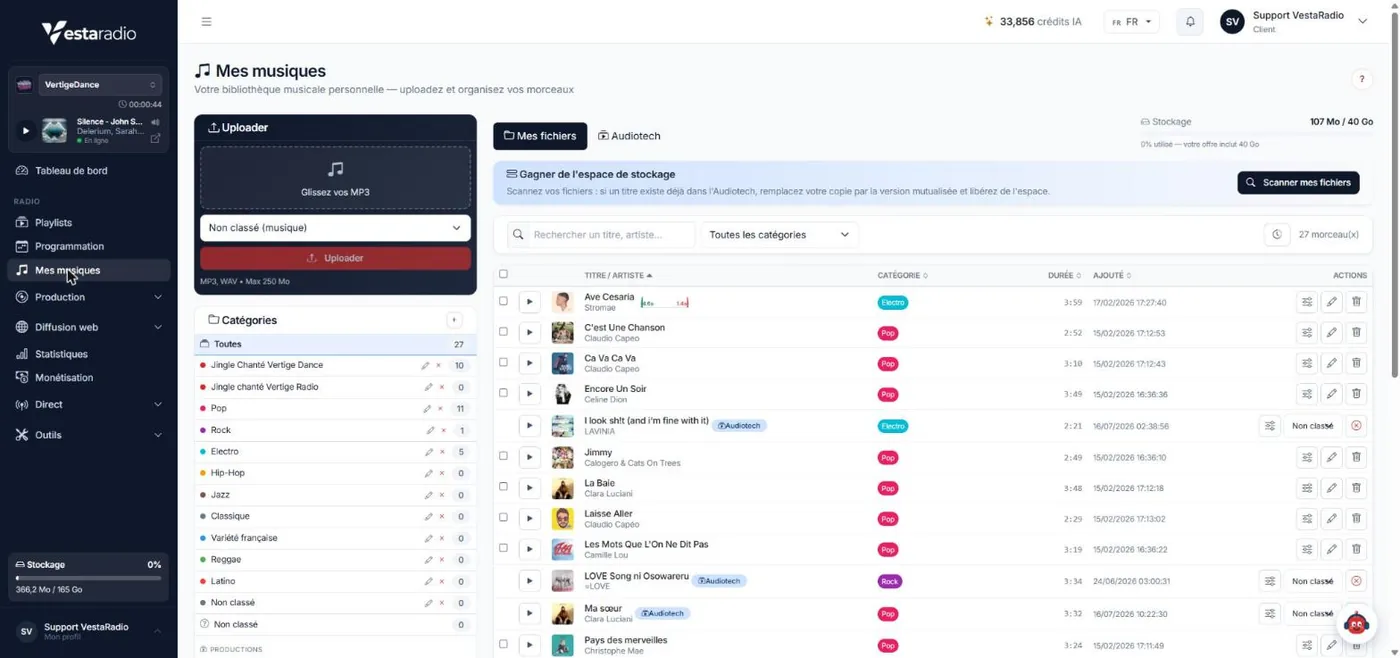
Your files have to be tagged properly (artist, title, album, genre) so that the metadata shows up for the listener and on the aggregators. A well-ordered catalogue means a schedule you can build in a few clicks. See music file management.
This is what separates a playlist from a real station. Identification jingles, stings, hourly idents, show themes: a few seconds of sound repeated all day that fix your name in listeners' memories. Discover our radio jingles, our ready-to-air segments, and lesson 5: station imaging.
All that is left is to give your audience somewhere to listen: a radio website with a clearly visible player , a mobile app, a presence on smart speakers and a listing in the main directories. Then you do your first show ( lesson 6: getting your first live show right will prepare you), and you start again the next day.

This is the question that stops the most projects, often for nothing. A web radio running automatically needsno audio equipment at all : you import your files, you build your schedule, the server broadcasts. Equipment only comes in when a voice goes on air.
We have costed three complete set-ups around RODE equipment: a home studio at 200 to 350 €,, a duo set-up at 900 to 1,200 € and a 4-position studio at 1,800 to 2,400 €. The item-by-item detail is on our radio equipmentpage, and personal guidance on choosing equipment comes with the RadioPROplan. See also lesson 4: building your radio studio.
A web radio remains a very accessible medium compared with terrestrial radio, where the transmitter alone runs to several thousand euros. Rather than vague ranges, here are the actual prices charged by VestaRadio, item by item. Only the music royalties, which are not ours to set, are given according to the published rates.
In practice, a community web radio starting out on automatic on the Evolution plan at 522 € a year, with a logo at 99 €, a first jingle pack at 99 € and the SACEM contract at around 89 € including VAT, ends its first year at around 810 €, equipment aside. Later years come down to a little over 610 €. See the detail of our web radio plans and pricing, or the RadioPRO pack if you are aiming at a professional project from the outset.
This is the point most often overlooked, and the only one that can really put a project in difficulty. Playing music publicly, even free of charge and even with no listeners at all, is an exploitation that requires authorisation.
In France two distinct rights sit on the same track. The author's right pays whoever wrote and composed the work: it is managed by SACEM, which offers a web radio contract whose rate depends on your status and on the number of channels you broadcast. Neighbouring rights pay the performer and the producer of the recording: they go through the SPRE, with producers represented by the SCPP and the SPPF.
These amounts are given as a guide and depend on your project and on the number of channels: always check the current rates with the organisations themselves.
If your project does not depend on the commercial repertoire, royalty-free music catalogues and Creative Commons licences let you broadcast legally with no recurring fee. It is a sensible option for an atmosphere station, in-store music or a corporate radio, less so for a mainstream music station whose identity rests on the songs of the moment.
We set out what to do, organisation by organisation, on our page about music licensing for web radio, and in summary in lesson 8: SACEM and SPRE.
A station that broadcasts without being found does not exist. The real work starts the day you go live.
Every extra platform is a way in. Your radio website with a player in plain sight, a mobile app in the station's colours, a presence on smart speakers so it can be started by voice, and a listing in the listening directories, which bring a passive audience worth having. Lesson 9: growing your audience sets out the three areas.
Your web radio statistics tell you far more than the number of listeners. They reveal your peak hours, the average listening time, which countries people are in and which devices they use. Three weeks of data beat six months of intuition when it comes to adjusting a schedule; lesson 11: making use of your statistics teaches you to read them.
Social media with video clips from your shows, partnerships with local artists or associations, a presence at events in your area or your community, and search visibility on the queries around your theme. Regularity counts for more than budget: a station that keeps its weekly appointment for a year builds an audience no one-off campaign can buy.
No. Unlike FM, which needs a frequency allocated by the regulator, broadcasting over the internet needs no licence to transmit. You do still have to declare your station to the rights collecting societies as soon as you play protected music.
Streaming means sending the sound in small successive packets that the listener's player assembles on the fly. Nothing is stored on their device: they hear it in real time, exactly as on an ordinary radio.
Shoutcast has historically been the simpler to set up, Icecast the more flexible and more open. Icecast, being open source, handles modern formats, multiple streams and metadata better, which has made it the standard among professional hosts. Either way, your host takes care of the configuration.
Four things really matter: how reliable the server is and its uptime, the bandwidth and the number of simultaneous listeners included, whether it works with your broadcasting software, and how quickly technical support replies. An outage on a Saturday night is settled in minutes or in days, depending on the provider.
Yes, and it is the most common way of working. In automatic mode the schedule is held on the broadcast server and runs without you. Your computer is only there to prepare content and to go live when you want to.
The technical side is settled in hours: the server is delivered and the stream is live within 24 hours with most hosts. The real time goes on editorial preparation, importing the music catalogue and the station imaging, which means two to four weeks for a careful launch.
Yes, and without going off air. The files, the programme schedule and the stream settings are carried over, then the switch happens at a time you choose. See the page transfer my station.
Yes, but rarely in the first year. Local advertising, show sponsorship, partnerships, memberships and donations are the main sources. Breaking even depends above all on how regular the audience is, not on its absolute size.
Want to learn step by step? Follow the Vesta Academy, our free course in 12 lessons
A broadcast server, an online manager, storage, a player and support: VestaRadio brings together everything your project needs, from the first show to growing your audience. Your station could be online tomorrow.
See the web radio plans Talk about my projectImportant : l'ancienne version (Studio 7) fermera le 15 août. Tous les comptes seront transférés vers la nouvelle version. Pensez à migrer dès maintenant.
Vous avez déjà une radio sur l'ancienne version ? Le passage à Studio 10 se fait avec l'accompagnement de notre équipe. Les rendez-vous débutent le 13 juin.
Transférer ma radio sur la nouvelle version